Views
Overview
Live Views allow a user to quickly apply a saved group of filters, map layers and sorting options instead of having to change each filter individually.
To the left of the login control icon in the top right are controls allowing the user to clear all filters, apply an existing view & save the current view (if permitted).

For example, the following vehicle filter shows all vehicles with their siren currently switched on, sorted by vehicle status:
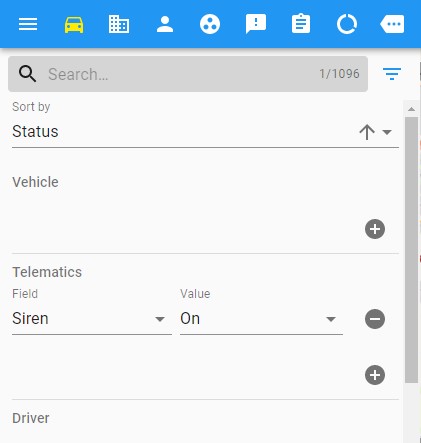
Rather than setting up the filter each & every time, all the current filters can be saved as a view using the save button:

You will need to enter a title for the view, and optionally a default tab.
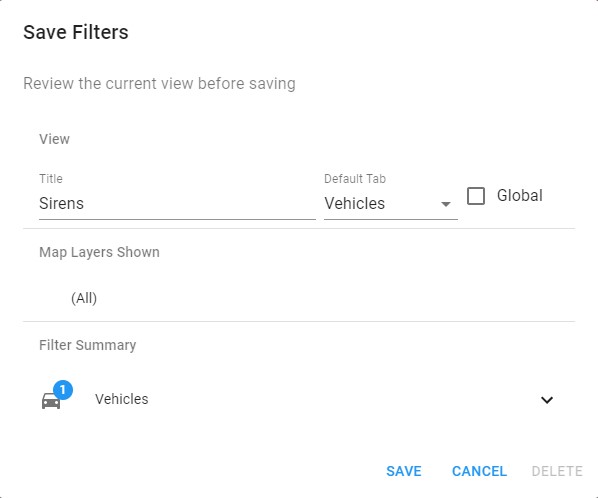
Once a view is saved it can be selected from the dropdown to replace the current view (filtering, sorting, layers shown etc.) with the values saved in the view.
You may save the view as 'Global' if you are a member of the IR3 Administrators group, in which case the global view will be available in the drop down for all users to select.
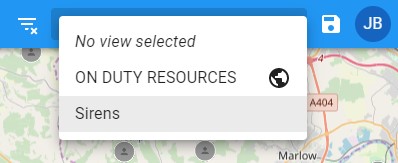
In the example above, 'ON DUTY RESOURCES' has been setup as a global view, as denoted by the globe symbol.
Views may be edited or deleted by selecting first, and then clicking on the Save View icon to bring up the Save Filters window.
All filters can be cleared by clicking on the icon to the left:
